Find the Code
Find the code in my repo dgx-spark-bare-metal here:
https://github.com/urbanspr1nter/dgx-spark-bare-metal
Let's run vLLM on multiple DGX Sparks.
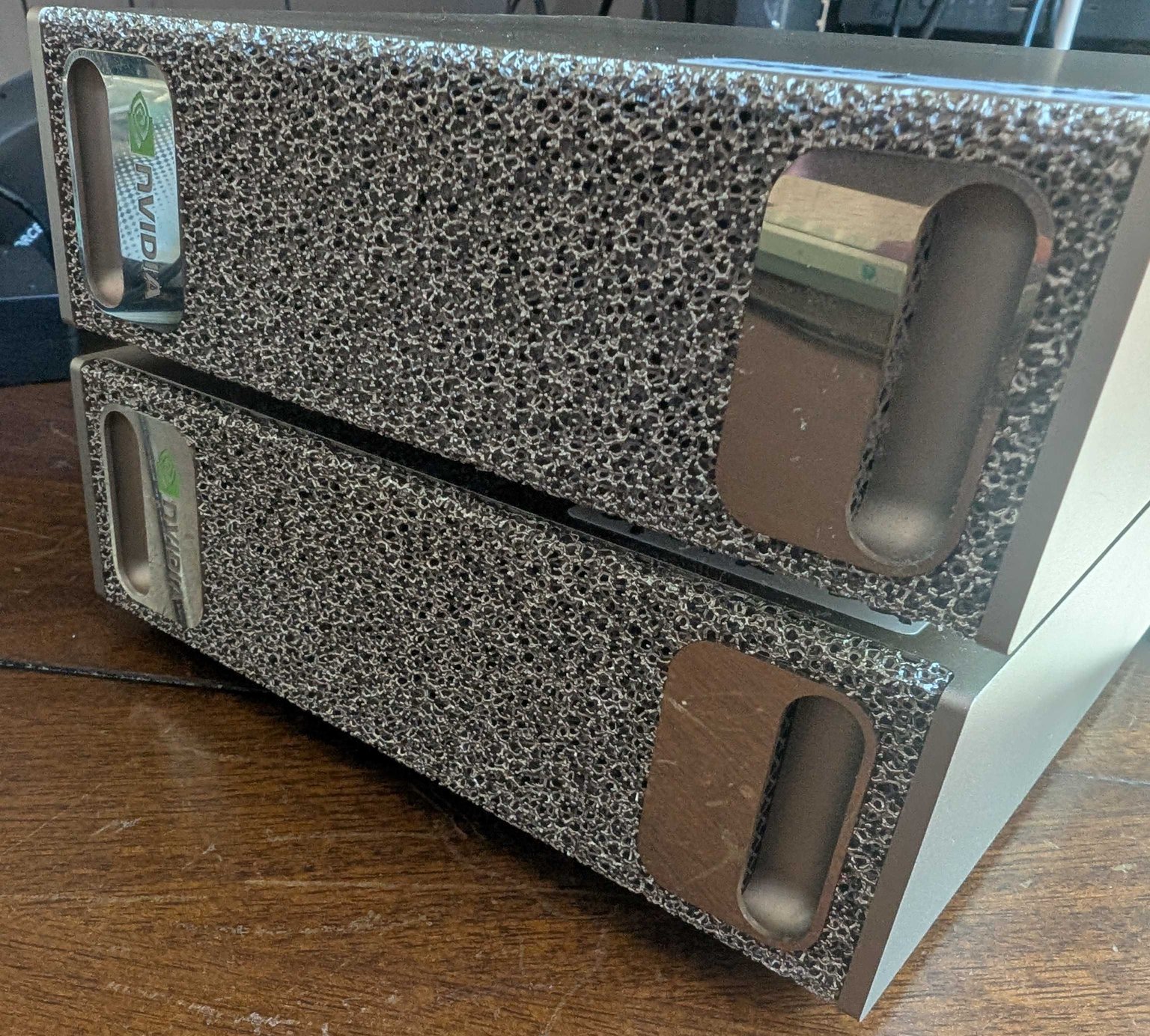
It is 2026 and yet another year I have not learned Docker or use it actively. My only active use is a "set it and forget it" type of scenario where I host my family photos in a VM with immich installed as the only Docker thing.
15 years and counting since I have started my professional career that I have always found a way to get around not using Docker.
I just don't have time to learn it in a way that doesn't involve copying and pasting commands. I just feel really guilty doing stuff like that for some reason... Even in local AI coding, I still find myself being entertained by what AI generates so that I can perform code reviews with the LLM.
I say I don't have the time to learn Docker deeply, but for some reason, I have time to build software from source and figure out how to run things on bare metal. Huh. Something doesn't track here. Hah....
Video Walkthrough
You can watch the video walkthrough of this post at the end of the post.
Goal
Let's get Qwen3.5-122B-A10B-FP8 working with the maximum context length of 256K tokens on TWO DGX Sparks! The model itself can't fit on a single DGX Spark since it is too big, but we can pull it off with clustering and achieve upwards of 21 tk/s generation rate.
As far as I know, this is probably the only guide on the internet so far that details how to build bare-metal vLLM on DGX Sparks with a modern powerful model like Qwen3.5. Yay. Go me...
My brain is fried though. I'm taking a break from fiddling with the DGX Sparks after this and will just... enjoy it.
My DGX Spark(s)
Keeping it short, I purchsed the DGX Sparks from an NVIDIA pre-order last summer in 2025. I have been using it as an "AI appliance" to do various generative AI tasks.
Most of the tasks involve just running VLMs to do classification and evaluation of results. My professional daily work requires a lot of this. Overall, the work isn't super cool and super exciting to document, but it is very reliable work for the DGX Spark. It is a workhorse (or maybe mule?) rather than a tinker machine.
Honestly, because of the important role it plays in my daily life, I haven't had time to put it into the "tinker bucket" and mess with it.
I also have a second DGX Spark. It sits more idle and serves as a single backup for whenever I need some extra compute.
Both machines are running Qwen3.5-27B and gpt-oss-120b respectively. The downside is... llama.cpp is the inference engine. Unless i have -np explicitly set, I can't really share resources with others in my family to use local LLMs. Even if I did, -np just doesn't feel as good as what vllm can bring with its batching/concurrency techniques.
I have been getting more and more into mini-PCs for AI recently. My obsession with trying to pack models into smaller computers and still get some use of them started with getting the MSI Cubi NUC 2MG. Now my hobby recently has been asking the question "Can it AI?" for any mini-PC I touch.
The DGX Spark is no exception.
Network Setup
For two DGX Sparks to cooperate with each other in model inference, they must be physically networked together using the high speed 200 Gbe network interface using a QSFP cable.
Here is the overall setup for what we will need to achieve DGX Spark clustering.
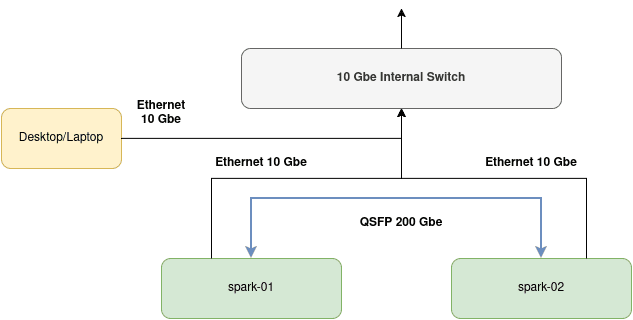
I have named my DGX Sparks spark-01 and spark-02. Both are connected to my home network through a 10 Gbe link. My desktop running Fedora is also connected to it.
The basic network connection is not enough as the DGX Sparks need to be in their own cluster to function cooperatively. Therefore, we must take advantage of the additional Connect-X 7 network interface that NVIDIA has provided in the Spark. A single link can get up to 200 Gbe. I believe in aggregate, we can get up to 400 Gbe. I am not an expert here. I just know cable goes in one way and goes out to another.
If you don't have a QSFP cable, the type you want to get is a QSFP56 cable:
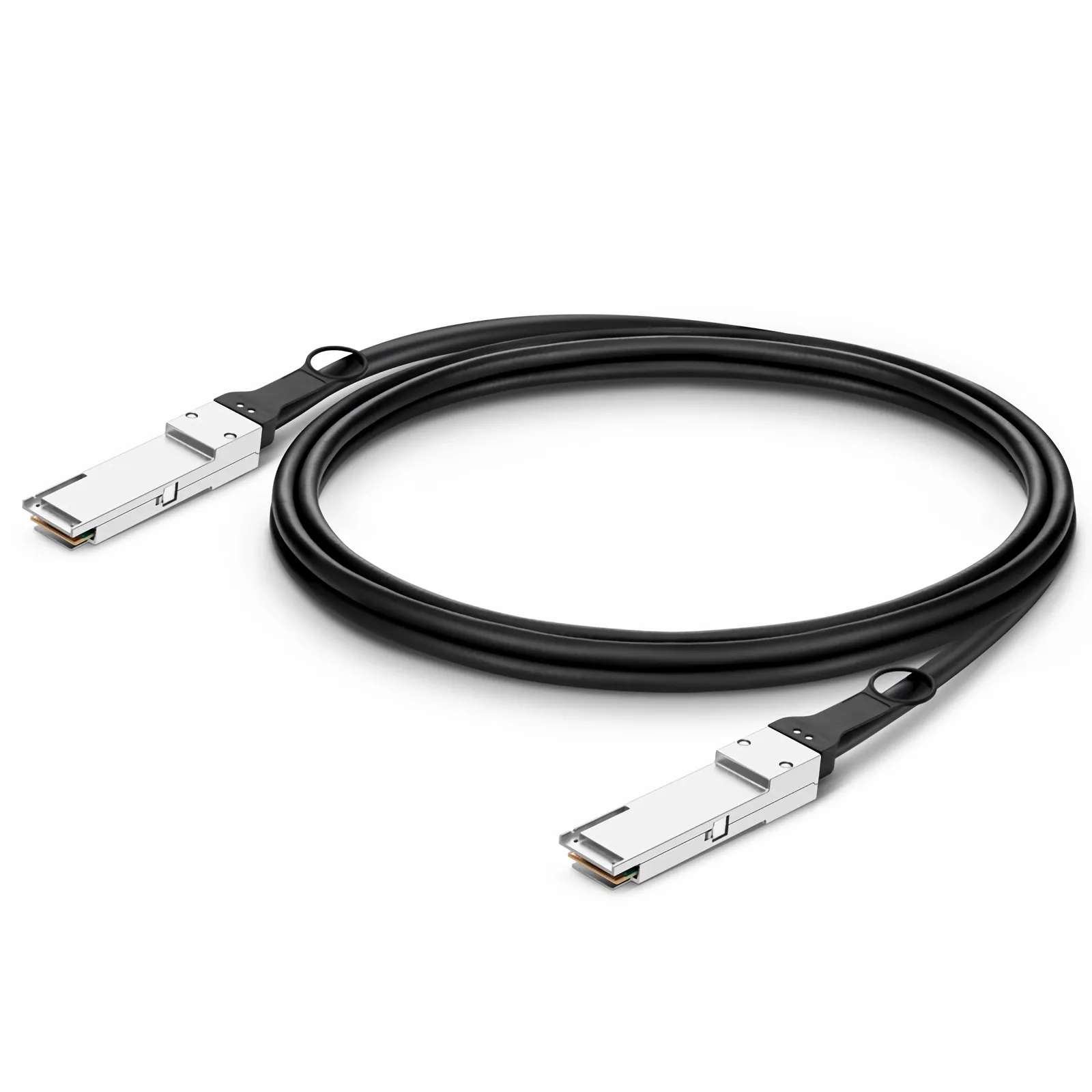
These are pretty pricey. NVIDIA seems to recommend some Mellanox ones. I just bought some generic ones and they seem to be fine.
DGX Spark Setup
For the rest of this article, I'll be referring to the main Spark node as "Spark A" and the secondary Spark as "Spark B".
Onboard both your Sparks:
- Make sure they are both up to date.
- Make sure SSH access is configured.
- Ensure that both have the same username.
- Both Sparks have memorable host names.
Follow this guide here for setup instructions:
Next, you'll want to configure both your Sparks to be able to communicate with each other. This means setting up an internal bridged network between the two with a 169.254.x.y IPv4 address.
Follow this guide here: Connect Two Sparks
I chose the easiest route and chose the options that were "automatic". The gist is:
Run ibdev2netdev to get information about the current link state of the RDMA adapters.
rngo@spark-01:~$ ibdev2netdev
rocep1s0f0 port 1 ==> enp1s0f0np0 (Up)
rocep1s0f1 port 1 ==> enp1s0f1np1 (Down)
roceP2p1s0f0 port 1 ==> enP2p1s0f0np0 (Up)
roceP2p1s0f1 port 1 ==> enP2p1s0f1np1 (Down)
rngo@spark-01:~$
Create a netplan for automatic IP assignment for those interfaces.
I ran these commands on BOTH Spark A and Spark B.
# Create the netplan configuration file
sudo tee /etc/netplan/40-cx7.yaml > /dev/null <<EOF
network:
  version: 2
  ethernets:
    enp1s0f0np0:
      link-local: [ ipv4 ]
    enp1s0f1np1:
      link-local: [ ipv4 ]
EOF

# Set appropriate permissions
sudo chmod 600 /etc/netplan/40-cx7.yaml

# Apply the configuration
sudo netplan apply
⚠️ You MUST run the netplan configuration on BOTH Sparks!
Run the discover-sparks.sh script to configure passwordless SSH for both Sparks:
Get the script: https://github.com/NVIDIA/dgx-spark-playbooks/blob/main/nvidia/connect-two-sparks/assets/discover-sparks
You only need to run this script on Spark A, the "leader" node.
Then copy your public keys to each node.
🚨 Critical: Make Note of Your Interfaces
When you run ibdev2netdev, record your interface names. They will be needed in later steps to full configure the ray cluster to inference.
The interface name is the one that shown as UP.
For example, I made notes for my own setup like this:
| Interface Name | enp1s0f0np0 |
| NCCL HCA | rocep1s0f0, roceP2p1s0f0 |
| Spark A Cluster IP | 169.254.195.229 |
| Spark B Cluster IP | 169.254.204.215 |
If you don't keep track of this information now, it's going to be difficult to set environment variables later.
A Clarification on DGX Spark Clustering 🤔
First, I would like to clarify what it means to "put 2 DGX Sparks" together.
If you watch a bunch of the NVIDIA presentations, their marketing (although they never explicitly state it in this way) make it seem like you can connect 2 DGX Sparks together with its 200 Gbe networking and gain 2x the performance and 2x the memory. A whopping 40 CPU cores and 256 GB of RAM! You're creating a "super Spark"!
One of the marketing pitches was to be able to load up a 200B model for inference (no mention about which quantization).
Well, not quite. When you "put 2 DGX Sparks" together, you're really just creating a distributed network where you can perform distributed computations with some parallelism strategy.
The Sparks themselves are still individuals.
For example, with the tensor parallelism strategy we will be exploring today using the ray backend, the system architecture is closer to what we are familiar with in cloud computing where we have leader and worker nodes.
Tensor Parallel vs Data Parallel
I have already hinted at this, but we will be using the tensor parallel strategy over data parallelism to serve our models within our Spark cluster.
What is the difference between the 2? I'll do my best to explain.
A typical LLM is composed of mostly layers of tensors. Each layer consists of tensors. When tensor parallel is configured, tensors get sharded across the GPUs and when it comes time to compute the layer, the GPUs will work on computing the tensors in parallel (at the same time) to achieve the results for that layer.
Tensor parallel is most helpful when we have a model that is too big to fit in a single GPU and we distribute the tensors across all GPUs. When it comes time to work on a specific layer, all GPUs that have tensors relating to the layer will be worked on.
With tensor parallelism, you'll achieve some speedup due to the parallel tensor computations, but it isn't N times better for N GPUs, but there is benefit. The real point here is that a large model is able to be distributed across the entire system to make it possible to inference.
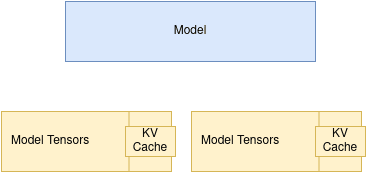
Data parallelism, on the other hand, is useful when the model already fits on a single system, but we want more throughput. In that case, we can load multiple full copies of the model across multiple nodes or GPUs and route different inference requests to different instances. This allows the system to handle more requests at once, but it does not help us run a single model that is too large to fit on one machine.
Data parallel does not sound like what we want to use to achieve our goals in running very large models in our 2 DGX Sparks. That's why we choose tensor parallelism.
vLLM
There is nothing wrong about llama.cpp. But for performance and throughput, nothing beats vLLM when taking support and running at the bleeding edge is considered. I just never got vLLM bare metal working for the Sparks and just fell back to the easiest thing with using llama.cpp.
NVIDIA has always made Docker images for vLLM available: https://build.nvidia.com/spark/vllm
Notice something here. The models supported isn't always the latest and greatest. This suggests that the vLLM version is behind. What if we want the bleeding edge?
Well, we can build vLLM from scratch! When I had first bought the DGX Sparks, doing this was quite challenging.
That was then, this is now. I regularly revisit technology that gave me issues leading me to give up... this week I decided to explore to see if vLLM has better support for the DGX Spark. (Or maybe the other way around.)
Short answer: Yes and no.
Yes in that you can build the latest vLLM from scratch and run the latest and greatest models. ✅
No in that promise in running DGX Sparks in a cluster with larger models is not "first class" and in my opinion, misleading. In short, the support here sucks. Preview: I want to run more than just "Llama 3 70B". More on that later. ❌
My gut feeling on why the support feels lackluster is due to the fact that NVIDIA may want to steer users towards developing against their own platform with the Sparks. (NIM, etc). Therefore, some of the open source contributions fall behind.
Building vLLM on the DGX Spark
Forgoing Docker, building vLLM from scratch is the only way to go. First thing's first, I assume you at least have your DGX Spark set up and updated. You'll also need these basic dependencies:
sudo apt update && sudo apt dist-upgrade -y
sudo apt install build-essential \
	python3-venv \
	python3-pip \
	python3-dev \
	pkg-config \
	cmake \
	ninja-build -y
vLLM is very C/C++ heavy, so just make sure you get your development environment issues solved before anything else.
CUDA 13.0
As of 2026, the DGX Spark should come preinstalled with CUDA 13.0. If you are not sure, just execute:
nvcc --versionThe information will show up right as a result of the command:
rngo@spark-01:~$ nvcc --version
nvcc: NVIDIA (R) Cuda compiler driver
Copyright (c) 2005-2025 NVIDIA Corporation
Built on Wed_Aug_20_01:57:39_PM_PDT_2025
Cuda compilation tools, release 13.0, V13.0.88
Build cuda_13.0.r13.0/compiler.36424714_0
rngo@spark-01:~$
If you are not seeing the right version, then stop right here and install CUDA 13.0.
The next step is to ensure your environment variables are set correctly in .bashrc.
export CUDA_HOME=/usr/local/cuda-13.0
export PATH="$CUDA_HOME/bin:$PATH"
export LD_LIBRARY_PATH="$CUDA_HOME/lib64:$LD_LIBRARY_PATH"
Yay. If you have done all that, you're good to go onto the next step. If not, fix it now. Seriously. Fix it now, because you do not want to have a hard time later with battling CUDA. If anything goes wrong, you won't need to dig so deep into understanding your CUDA setup if things go wrong during build. Yes, this is a warning.
CUDA Graphs and --enforce-eager
You'll notice as you progress through this article, that I use --enforce-eager. This is because vLLM and ray haven't played nice in a while. Because of some of the strangeness I encountered here, I found that disabling CUDA graph compilation with --enforce-eager stabilized inference.
When the vllm session is served with the CUDA graphs compiled, you'll notice weird behaviors on any model where generation just stops due to a worker node not being able to communicate back to the leader node. ray eventually times out.
I personally don't know what the problem is, but I discovered that --enforce-eager helps (bypasses the CUDA graph compile).
We take a performance hit here, but at least we have stable inference.
🤷
Flash Attention vs Triton Attention
Too bad, you essentially have 1 choice here when working with the DGX Spark. Something is also strange with flash_attn. If you want, you can build it yourself. I've tried to keep this guide as simple as possible so I have decided to use triton_attn as the attention backend.
You'll have vllm scream at you if you don't configure the --attention-backend correctly. If no screaming, then you'll see interesting generation effects.
Regardless, you'll know when to set this.
Filesystem Structure
Both your Sparks must:
- Have the same username.
- Have the same file system layout.
- Models must be stored in the same path.
- vLLM must be installed in the same path
Essentially, your Sparks are mirrors of each other. Keep it that way. It is a requirement.
I basically work off of a single directory: $HOME/models.
If you haven't done this, do it now:
mkdir $HOME/models
That's a lot of stuff to do already... Still want to do this? 🤔
If you find this too complicated, perhaps invest in using a pre-made Docker image to spin up a container?
Docker isn't my thing, but that doesn't mean it isn't right for you. It can be the solution for you if you don't want to tinker.
Eugr has a great pre-made Docker image that ensures the latest and greatest vLLM works on the Spark: https://github.com/eugr/spark-vllm-docker
Models
For this exercise you'll need to place models in the $HOME/models directory. Here are some suggested ones:
- Qwen2.5-7B-Instruct (v0.16.0)
- Qwen3-4B-Instruct-2507 (v.0.16.0)
- Qwen3-VL-4B-Instruct (v.0.16.0)
- Qwen3.5-35B-A3B (v.0.19.0)
- Qwen3.5-122B-A10B-FP8
Yes, I really like the Qwen family of models.
git clone them all to the $HOME/models directory in Spark A.
Once all of them are downloaded, rsync to Spark B:
rsync -avh --inplace --partial --progress $HOME/models/ username@ip:/home/username/models/It is going to take a while, but it beats double-downloading and wasting internet bandwidth.
Environment Variables for DGX Spark Cluster Inference
When setting up clustering, you'll notice several environment variables I will be setting:
export VLLM_IFACE=enp1s0f0np0
export NCCL_SOCKET_IFNAME=$VLLM_IFACE
export GLOO_SOCKET_IFNAME=$VLLM_IFACE
export NCCL_IB_HCA=rocep1s0f0,roceP2p1s0f0
export NCCL_IB_DISABLE=0
export VLLM_HOST_IP=169.254.195.229VLLM_IFACEis the ethernet interface name of the port that your QSFP cable is connected to. It's the one thatibdev2netdevsays is UPNCCL_SOCKET_IFNAMEis the same asVLLM_IFACEGLOO_SOCKET_IFNAMEis the same asVLLM_IFACENCCL_IB_HCAis are the RDMA interfaces that you get fromibdev2netdev.NCCL_IB_DISABLEtells NCCL to use the RoCE interfaces if set to 0.VLLM_HOST_IP- this is the leader node. In this case, Spark A.
Anyway, to keep the explanations concise in the following sections, just refer to this section when unsure what these environment variables mean.
Which vLLM Version?
It depends. You have 2 paths. The easy way, or the hard way. Keep in mind this guide is focused on getting vLLM working for both single node and cluster node for tensor parallel scenarios.
Background
vLLM was pinned to torch 2.10.0+ for version 0.17.0 and onwards. For single node inference, this isn't a huge issue. It's still just compile and run. For clustering in either the mp and ray distributed backend scenarios, you find that 2 DGX Sparks connected through the QSFP interfaces is... broken.
Some of the symptoms you might encounter in the distributed inference scenario:
- Generation stopping midway after anywhere from 100-300 tokens.
- Worker node stalling and NCCL waiting for one node to catch up to the other.
- Nodes dropping back in and out.
It is ugly. But if you just want to see distributed inference in action, you can checkout v0.16.0 which has modern-ish model support like Qwen3/VL and run things just fine if you build vLLM against torch 2.9.1. I suspect this is what the official NVIDIA Docker image is doing.
That's the easy way.
Now, the hard way - you'll need to do a delicate dance of pinning versions, setting environment variables and getting things just right with the stars and moons aligned with a bit of chants to get things to go the right way. I'm just kidding -- All of it is fixed now, but it isn't obvious to get working. Basically, you'll need to set the appropriate environment variable to the Spark's architecture and download the nightly CUDA 13 build of torch.
Let's just get right on to it.
Note: Despite all this, you probably won't notice any weird behavior on single node inference. So, if you want to just stick with single node inference, then the latest and greatest vLLM should work right off the bat if you build from source.
The Easy Way (v0.16.0)
If you don't care about running bleeding-edge models like Qwen3.5 or Gemma4 and want to stay with something tried and true like Qwen3 or Gemma3, then you'll have a pretty straightforward path to getting it all working.
The easy path is going to go through setting up vLLM for 1 node inference and then 2 node cluster inference. Again, in vLLM v0.17.0 the torch version was upgraded to require 2.10.0 to properly build.
If you're on single node, you are fine. Using the latest vLLM version will be OK.
But for cluster inference, it's quite broken today. My assumption is that, if you're not using a Docker provided image from NVIDIA, chances are, you are just out on your own for this. Posting on the NVIDIA forums, support will usually attempt to steer you towards the Docker image. That's fine.
But there's a real problem here for the ecosystem if there's a lot of custom patching involved to get a platformed marketed towards AI development. You're supposed to spend more time developing AI applications than wrangling a development platform to then let you develop an AI application.
Anyway for this tutorial, we'll fall back to v0.16.0. This is the last working version before the torch 2.10.0 migration. Maybe one day it will be fixed. Who knows?
Create the "workspace"
This will be where your vLLM repo gets cloned.
mkdir $HOME/models/legacy
cd $HOME/models/legacy
Clone vLLM and Checkout 0.16.0
For both Spark A and Spark B:
Run the following to clone vLLM, and checkout to the v0.16.0 release:
git clone https://github.com/vllm-project/vllm

cd vllm

git checkout v0.16.0
git clean -fdx

git reset HEAD --hard
Setup the Python Environment and Build Configuration
For both Spark A and Spark B:
This one requires a bit of focus. You'll need a clean virtual environment within the vllm repository. Make sure you are in the vllm directory. If not, cd into the repo directory. Then activate the virtual environment.
cd vllm # If not already in

python3 -m venv .venv
source .venv/bin/activate
You'll need to setup uv and also grab torch 2.9.1 for CUDA 13.0.
pip install uv wheel setuptools
uv pip install torch==2.9.1 torchvision==0.24.1 torchaudio==2.9.1 --index-url https://download.pytorch.org/whl/cu130
Don't forget, after this, you must specify for vllm build scripts to use the existing torch installation for building. The use_existing_torch.py script in the root of the repo exists just for this.
python use_existing_torch.pyNow, align the build tools with what vllm expects:
pip install -r requirements/build.txtBuild vLLM v0.16.0
Now that you have the environment ready for building the next set of commands will produce the actual build. Yes, it is misleading that the messages say "preparing packages" but underneath the hood there is stuff going on. MAX_JOBS will just specify the number of threads to use during build. You know, I like to use everything I have so $(nproc) it is.
We will also build with --no-build-isolation to ensure that the Python environment being used is the virtual environment that we have been working in. vllm build process may spin up a clean one just to build, so we need to override that behavior.
export MAX_JOBS=$(nproc)
uv pip install --no-build-isolation -e .
It will take a while, but it will get there.
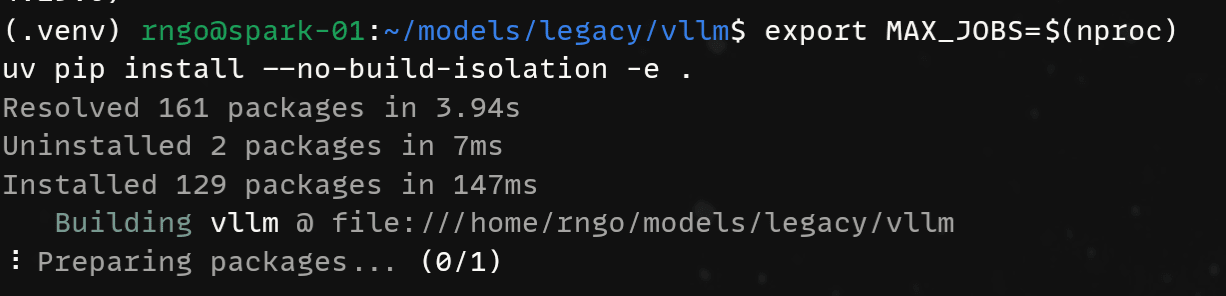
I would definitely fire up htop or btop at this point to monitor CPU activity. If there is activity and it is taking a while, then that's okay. If there's no activity, then that's bad. Just repeat the steps again or reboot.

Triton (ptxas error)
The bundled triton is too old to run and for some reason if you encounter ptxas error where the recognized GPU is an unsupported architecture (sm121a), then you'll need to upgrade triton. It is safe.
Do this for both Spark A and Spark B.
pip install -U tritonDistributed Backend: Ray
For vllm<=0.19.0, ray will be included within the installation package. The mental model is this:
- Spark A will be the leader node, you will start
rayfirst on this machine. - Spark B will be the follower node, you will start
rayafter Spark A comes online. - Spark B registers itself with Spark A. Now both are connected to each other.
- Spark A will then start
vllm. Spark B doesn't need to do this as its job is just to provide extra compute and memory during inference.
Create the ray clusters and register your nodes. Start Spark A first, followed by Spark B!
# Make sure you are in the virtual environment of your vllm install.
# Make sure you are in the project directory of your vllm repo.
cd $HOME/models/legacy/vllm
source .venv/bin/activate

# Assume start-ray-spark-[a|b].sh is in $HOME/models/legacy

# Spark A
../../start-ray-spark-a.sh

# Spark B
../../start-ray-spark-b.sh
Testing v0.16.0
We're going to test various models to verify the stability of our platform. Initial tests will be simple, using the "DOOM" of LLMs which in my opinion at this point, Qwen2.5-7B-Instruct. We move onto more modern models like Qwen3-4B and then go multi-modal with Qwen3-VL-4B. These will give us confirmation and comfort that we have done the right things.
You will run vllm only from Spark A!
Qwen2.5-7B-Instruct - The DOOM of Models
Advice: Use a tried and true tested model! Our good old friend Qwen2.5-7B-Instruct. This model to me is like the DOOM of LLM. Testing with this model is going to give a good sign whether it is the platform stack that's broken, or if it's just an "unsupported model" or something novel about the model itself.
Basic config:
- Context length: 32,768 tokens (native without YaRN extension)
- TP=1 (we will only inference with single node for now)
#!/bin/bash

# Model: https://huggingface.co/Qwen/Qwen2.5-7B-Instruct

export TRITON_PTXAS_PATH=$(which ptxas)

# Note the legacy location!
$HOME/models/legacy/vllm/.venv/bin/vllm serve \
        --enforce-eager \
        --served-model-name Qwen2.5-7B-Instruct \
        --model /home/rngo/models/Qwen2.5-7B-Instruct \
        --gpu-memory-utilization 0.8 \
        --max-model-len 32768 \
        --host 0.0.0.0 \
        --port 8000 \
        --attention-backend triton_attn \
        --tensor-parallel-size 1  \
        --data-parallel-size 1
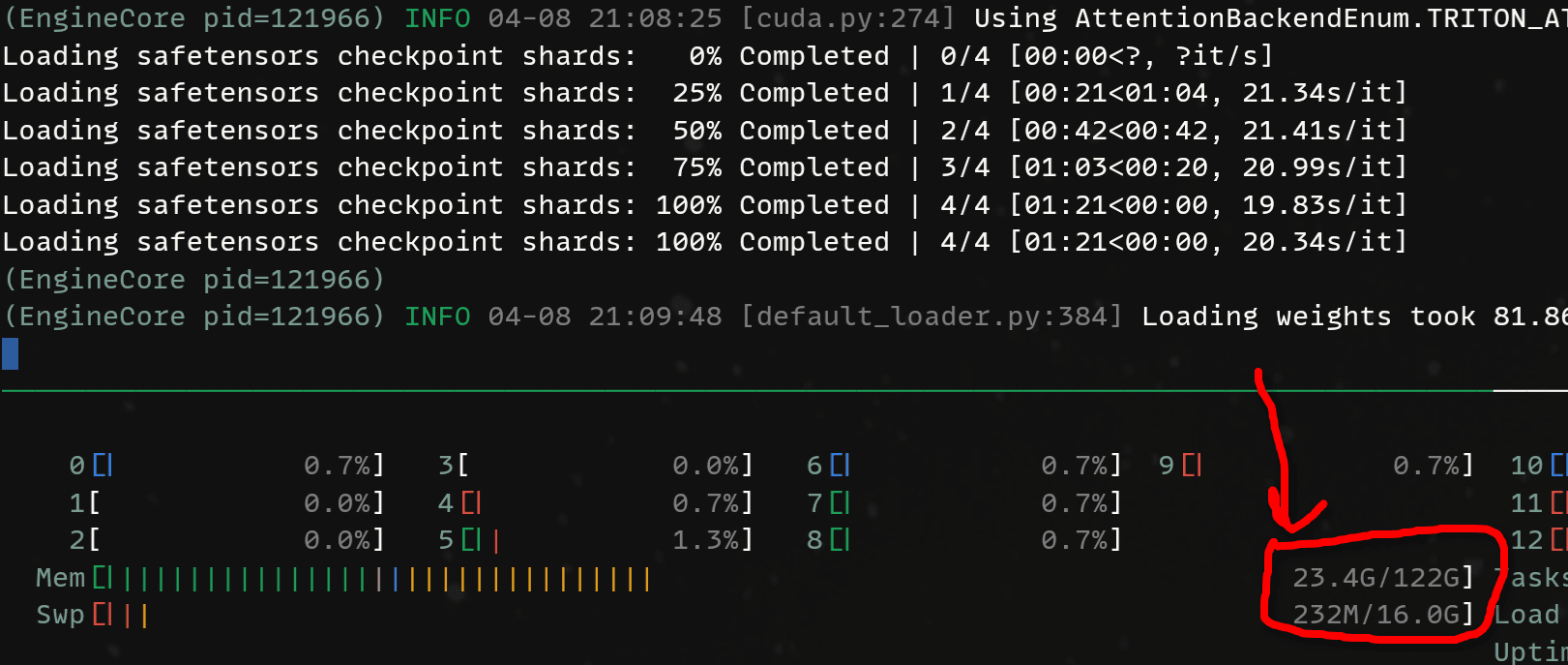
When loading the model, pay attention to the amount of memory being used:
Now, inference. Here's our fun test prompt:
Is it possible for a US Revolutionary War soldier or a child of one to have lived to see the 1900s? Consider that grand-children and onwards do not count.How much do we generate? And what is the token generation speed?
| Tokens | Time (s) | Generation Rate (tk/s) |
|---|---|---|
| 448 | 34.76 s | 12.9 tk/s |

Then kick it up by distributing the model across both nodes. You can run the same script but now with --tensor-parallel-size set to 2.
#!/bin/bash

# Model: https://huggingface.co/Qwen/Qwen2.5-7B-Instruct

export VLLM_IFACE=enp1s0f0np0
export NCCL_SOCKET_IFNAME=$VLLM_IFACE
export GLOO_SOCKET_IFNAME=$VLLM_IFACE
export NCCL_IB_HCA=rocep1s0f0,roceP2p1s0f0
export NCCL_IB_DISABLE=0
export VLLM_HOST_IP=169.254.195.229

$HOME/models/legacy/vllm/.venv/bin/vllm serve \
        --enforce-eager \
        --distributed-executor-backend ray \
        --data-parallel-address 169.254.195.229 \
        --data-parallel-rpc-port 13345 \
        --served-model-name Qwen2.5-7B-Instruct \
        --model /home/rngo/models/Qwen2.5-7B-Instruct \
        --gpu-memory-utilization 0.8 \
        --max-model-len 32768 \
        --host 0.0.0.0 \
        --port 8000 \
        --attention-backend triton_attn \
        --tensor-parallel-size 2  \
        --data-parallel-size 1
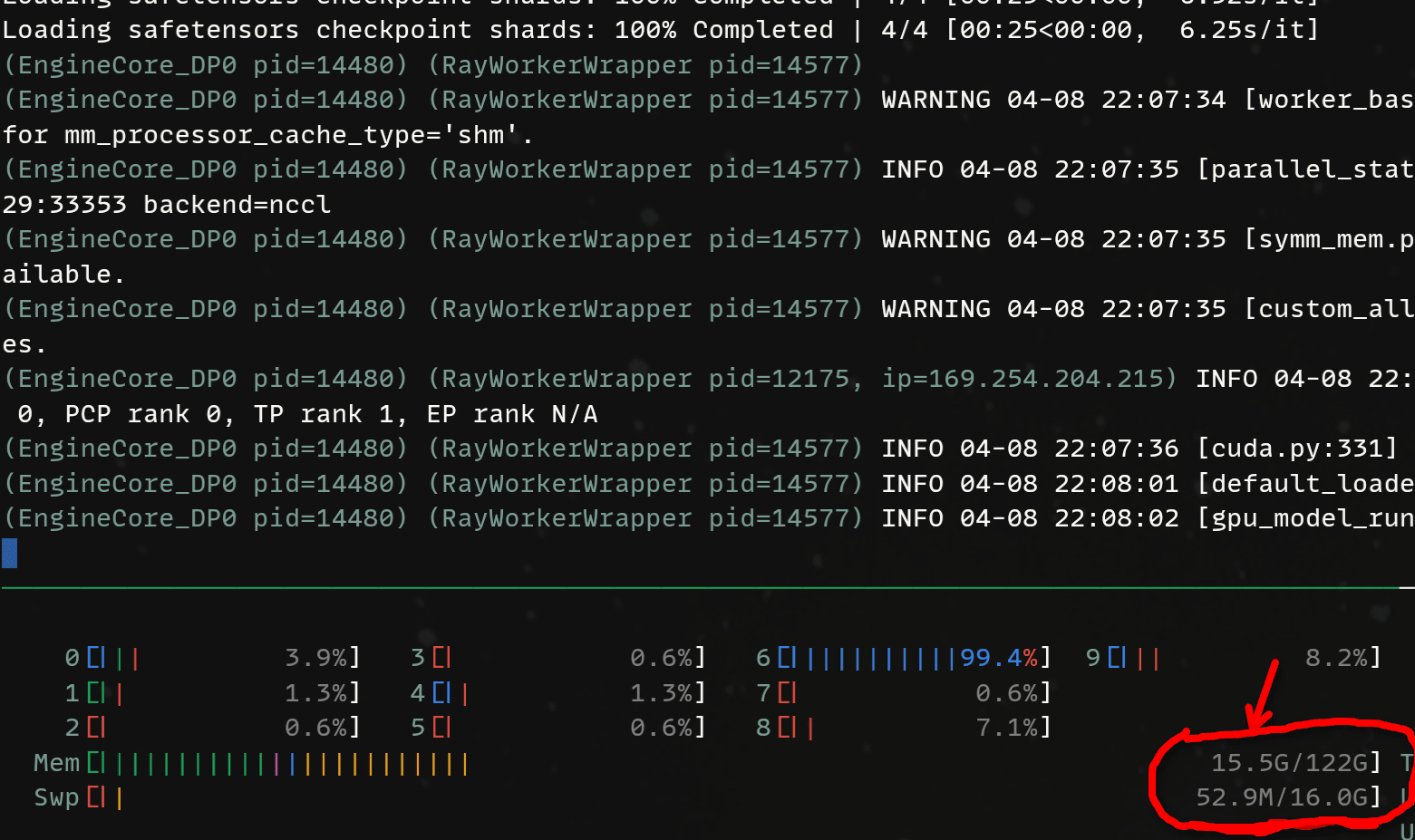
Again, pay attention to the memory usage. Notice how it has dropped significantly loading the model? That's because now, other pieces of the model are being loaded onto Spark B!
| Tokens | Time (s) | Generation Rate (tk/s) |
|---|---|---|
| 352 | 15.65 s | 22.5 t/s |

As you can see, the Sparks are not that fast in general but we do gain some uplift by increase tensor parallelism to 2. Both Sparks are now computing tensors in parallel for a specific layer. This decreases the forward pass time for each token.
Qwen3-4B-Instruct-2507
Let's try something more modern with Qwen3-4B-Instruct-2507. It's a newer model and "closer" to being useful in the modern day (still no 3.5 though):
#!/bin/bash

# Model: https://huggingface.co/Qwen/Qwen3-4B-Instruct-2507

# Note the legacy location!
$HOME/models/legacy/vllm/.venv/bin/vllm serve \
        --enforce-eager \
        --served-model-name Qwen3-4B-Instruct-2507 \
        --model /home/rngo/models/Qwen3-4B-Instruct-2507 \
        --gpu-memory-utilization 0.8 \
        --max-model-len 262144 \
        --host 0.0.0.0 \
        --port 8000 \
        --attention-backend triton_attn \
        --tensor-parallel-size 1  \
        --data-parallel-size 1
| Tokens | Time (s) | Generation Rate (tk/s) |
|---|---|---|
| 834 | 37.51 s | 22.2 tk/s |

Qwen3 seems to be a faster model to generate so far. Note the number of tokens. We are not yet using a true thinking model.
Let's try TP=2 and bring Spark B into the mix:
#!/bin/bash

# Model: https://huggingface.co/Qwen/Qwen3-4B-Instruct-2507

export VLLM_IFACE=enp1s0f0np0
export NCCL_SOCKET_IFNAME=$VLLM_IFACE
export GLOO_SOCKET_IFNAME=$VLLM_IFACE
export NCCL_IB_HCA=rocep1s0f0,roceP2p1s0f0
export NCCL_IB_DISABLE=0
export VLLM_HOST_IP=169.254.195.229

# Note the legacy location!
$HOME/models/legacy/vllm/.venv/bin/vllm serve \
        --enforce-eager \
        --distributed-executor-backend ray \
        --data-parallel-address 169.254.195.229 \
        --data-parallel-rpc-port 13345 \
        --served-model-name Qwen3-4B-Instruct-2507 \
        --model /home/rngo/models/Qwen3-4B-Instruct-2507 \
        --gpu-memory-utilization 0.8 \
        --max-model-len 262144 \
        --host 0.0.0.0 \
        --port 8000 \
        --attention-backend triton_attn \
        --tensor-parallel-size 2  \
        --data-parallel-size 1
Do we get the same speed up as before? Yes. By now you'll see that TP=2 does help in not only scenarios where the model might be too big to fit in a single node, but we also get increase performance (decreased generation time) for each token.
| Tokens | Time (s) | Generation Rate (tk/s) |
|---|---|---|
| 675 | 20.00 s | 33.7 tk/s |

Qwen3-VL-4B-Instruct
Now, finally let's bring some multimodal into the mix. Qwen3-VL-4B-Instruct is a good candidate. This one introduces a new argument --mm-encoder-attn-backend. Just for reference, when working with vision language models, the model developers can actually use a different attention backend for the vision layers. The flag --mm-encoder-attn-backend overrides that attention backend. 0.16.0 doesn't have triton_attn for the --mm-encoder-attn-backend so we fall back to torch_sdpa.
#!/bin/bash

# HuggingFace: https://huggingface.co/Qwen/Qwen3-VL-4B-Instruct

# Note the legacy location!
$HOME/models/legacy/vllm/.venv/bin/vllm serve \
        --enforce-eager \
        --served-model-name Qwen3-VL-4B-Instruct \
        --model /home/rngo/models/Qwen3-VL-4B-Instruct \
        --gpu-memory-utilization 0.8 \
        --max-model-len 262144 \
        --host 0.0.0.0 \
        --port 8000 \
        --attention-backend triton_attn \
        --mm-encoder-attn-backend torch_sdpa \
        --tensor-parallel-size 1  \
--data-parallel-size 1| Tokens | Time (s) | Generation Rate (tk/s) |
|---|---|---|
| 1250 | 56.58 s | 22.1 tk/s |

Now with an image:
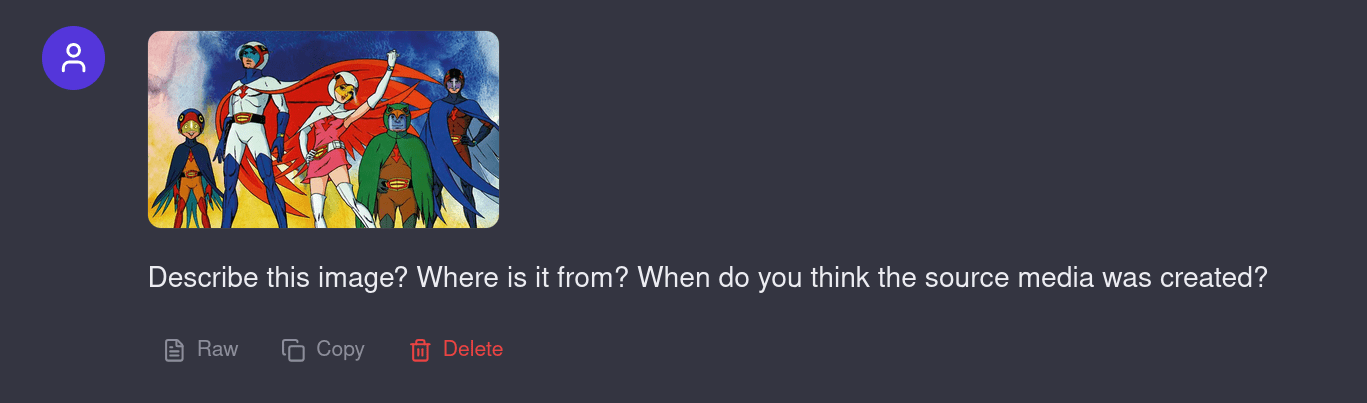
Of course, the answer was hallucinated. I was looking for Gatchaman.
This image is a promotional illustration for the Japanese anime television series **“Ultraman Taro”** (ウルトラマンタロウ), which aired in 1972.

The characters depicted are the main members of the **“Taro Squadron”** (タロウ隊), a team of alien heroes who fight alongside the hero Ultraman Taro. The illustration showcases the team in their signature costumes, each with distinct colors and designs:

- **Ultraman Taro** (the central figure): A tall, muscular hero in a white and blue suit with a red cape and a red “T” emblem on his chest.
- **Taro’s female partner**: Wearing a pink dress and a white helmet with a red cape, she raises her arm in a heroic pose.
- **The green-skinned, owl-like hero**: Wearing a green cape and a mask.
- **The blue-skinned, masked hero**: Wearing a dark blue cape.
- **The small, bird-like hero**: Standing on the far left, with a blue and orange suit and a bird-like helmet.

The art style is characteristic of 1970s Japanese anime, with bold lines, bright, saturated colors, and dynamic, heroic poses. The background features a stylized sky with swirling clouds, adding to the dramatic and epic feel of the scene.

**Source and Creation Date:**
- **Origin**: The image is from the Japanese anime series *Ultraman Taro* (1972).
- **Creation Date**: The series was produced and aired in **1972**, making the source media from that year. The artwork was likely created during the production of the series, around 1972, as promotional material or part of the show’s official branding.

This illustration captures the essence of the 1970s tokusatsu and anime style, emphasizing teamwork and heroism in a fantastical, science-fiction setting.| Tokens | Time (s) | Generation Rate (tk/s) |
|---|---|---|
| 402 | 19.57 s | 20.5 tk/s |

How about TP=2
#!/bin/bash

# HuggingFace: https://huggingface.co/Qwen/Qwen3-VL-4B-Instruct

export VLLM_IFACE=enp1s0f0np0
export NCCL_SOCKET_IFNAME=$VLLM_IFACE
export GLOO_SOCKET_IFNAME=$VLLM_IFACE
export NCCL_IB_HCA=rocep1s0f0,roceP2p1s0f0
export NCCL_IB_DISABLE=0
export VLLM_HOST_IP=169.254.195.229

# Note the legacy path!
$HOME/models/legacy/vllm/.venv/bin/vllm serve \
        --enforce-eager \
        --distributed-executor-backend ray \
        --data-parallel-address 169.254.195.229 \
        --data-parallel-rpc-port 13345 \
        --served-model-name Qwen3-VL-4B-Instruct \
        --model /home/rngo/models/Qwen3-VL-4B-Instruct \
        --gpu-memory-utilization 0.8 \
        --max-model-len 262144 \
        --host 0.0.0.0 \
        --port 8000 \
        --attention-backend triton_attn \
        --mm-encoder-attn-backend torch_sdpa \
        --tensor-parallel-size 2  \
--data-parallel-size 1 | Tokens | Time (s) | Generation Rate (tk/s) |
|---|---|---|
| 1587 | 47.64 | 33.3 tk/s |

Seems to be purely coincidental a bunch of tokens was generated for text to answer the US Soldier prompt.
And with the Gatchman image prompt:
| Tokens | Time (s) | Generation Rate (tk/s) |
|---|---|---|
| 565 | 17.86 s | 31.6 tk/s |

I guess these results are great, but they are not that convincing as to why I would buy DGX Sparks. If I am going to run 4B models all day, I should just get 5060 Tis.
Our 2 DGX Sparks have 122GB of usable memory each. That's 244GB to play with. Let's not waste it on little 4B models...
Qwen3-VL-32B-Thinking
For fun, lets load up Qwen3-VL-32B-Thinking. This is a big model, taking up an initial 70 GB of memory before KV cache is allocated! 🤯 This pushes a single node and because it is a dense model, all 32B parameters are active for every token generation.
Expectation: In consideration of vLLM's aggressive nature in allocating KV cache, this model WILL NOT load with 256K context.
#!/bin/bash

# HuggingFace: https://huggingface.co/Qwen/Qwen3-VL-32B-Thinking

# Note the legacy location!
$HOME/models/legacy/vllm/.venv/bin/vllm serve \
        --enforce-eager \
        --served-model-name Qwen3-VL-32B-Thinking \
        --model /home/rngo/models/Qwen3-VL-32B-Thinking \
        --gpu-memory-utilization 0.8 \
        --max-model-len 262144 \
        --host 0.0.0.0 \
        --port 8000 \
        --attention-backend triton_attn \
        --mm-encoder-attn-backend torch_sdpa \
        --reasoning-parser qwen3 \
        --tensor-parallel-size 1  \
        --data-parallel-size 1
Hah! I was right! At 256k context length, serving a 32B dense model is not going to work! We need a lot more memory!
(EngineCore_DP0 pid=22584) ValueError: To serve at least one request with the models's max seq len (262144), (64.0 GiB KV cache is needed, which is larger than the av
ailable KV cache memory (32.1 GiB). Based on the available memory, the estimated maximum model length is 131456. Try increasing `gpu_memory_utilization` or decreasing
 `max_model_len` when initializing the engine. See https://docs.vllm.ai/en/latest/configuration/conserving_memory/ for more details.
[rank0]:[W409 06:49:29.853810391 ProcessGroupNCCL.cpp:1524] Warning: WARNING: destroy_process_group() was not called before program exit, which can leak resources. Fo
r more info, please see https://pytorch.org/docs/stable/distributed.html#shutdown (function operator())
What we will need to do is go with TP=2. Bring Spark B into the service!
 #!/bin/bash

export VLLM_IFACE=enp1s0f0np0
export NCCL_SOCKET_IFNAME=$VLLM_IFACE
export GLOO_SOCKET_IFNAME=$VLLM_IFACE
export NCCL_IB_HCA=rocep1s0f0,roceP2p1s0f0
export NCCL_IB_DISABLE=0
export VLLM_HOST_IP=169.254.195.229

$HOME/models/legacy/vllm/.venv/bin/vllm serve \
        --enforce-eager \
        --distributed-executor-backend ray \
        --data-parallel-address 169.254.195.229 \
        --data-parallel-rpc-port 13345 \
        --served-model-name Qwen3-VL-32B-Thinking \
        --model /home/rngo/models/Qwen3-VL-32B-Thinking \
        --gpu-memory-utilization 0.8 \
        --max-model-len 262144 \
        --host 0.0.0.0 \
        --port 8000 \
        --attention-backend triton_attn \
        --mm-encoder-attn-backend torch_sdpa \
        --tensor-parallel-size 2  \
        --data-parallel-size 1
Aaaand, it works
(APIServer pid=22806) INFO:     Started server process [22806]
(APIServer pid=22806) INFO:     Waiting for application startup.
(APIServer pid=22806) INFO:     Application startup complete.
Qwen3-VL is quite the thinker, so we end up generating a lot of tokens for the same prompt.
| Tokens | Time (s) | Generation Rate (tk/s) |
|---|---|---|
| 4597 | 673.00 | 6.8 tk/s |

For vision, here are the stats:
| Tokens | Time (s) | Generation Rate (tk/s) |
|---|---|---|
| 1227 | 179.97 s | 6.8 tk/s |

The performance is slow and that is expected since the Spark only provides 273 GB/s of memory bandwidth. Shifting a ~70 GB back and forth with caching optimizations does get us a little higher with the theoretical generation rate ,but we we are still in single-digit token generation rates. But with clustering, we can at least run a 32B vision language model at full precision!
Try out other models. I encourage to experiment and see what's best for you. What you will probably just need to keep in mind is that 0.16.0 will not support some of the newer models that have recently released after March 2026. Read on the next section to find out how to run the latest and greatest vLLM versions.
⚠️ Wait. Hold up.,. Then why did you provide this "legacy" path?
The modern path, or "hard way" involves building vLLM with a certain set of dependencies, then tearing out those dependencies and reinstalling more recent versions (
transformers, etc). Depending on your deployment practices, this can be risky as there are no guarantees that vLLM has been tested in those specific common code paths that the new version may have modified.You'll just have to experiment/test yourself to see if things work the way you expect.
Choose 0.16.0 if you want to have something more predictable.
vLLM v0.17.0+ - Living on the Bleeding Edge
If I was to just go with the "easy" way above. I'd be stuck with v0.16.0 for a long time. This means that Qwen3-VL-32B would probably be the best model I can run as most interesting models have come out recently (IMO) and are only supported in 0.17.0+. I don't think there's a specific reason for this... It's just timing.
Anyway, why did I even decide to document both ways? Production deployment. For sure, the easy way in rolling with vllm v0.16.0 is the way to go if you prioritize predictability and stability. It just works. If your production models are supported in these versions, then it is the preferred method.
However, if you're like me, you want to stay on the bleeding edge. So therefore you, like me, must find a way to get it to work so you can run Qwen3.5-122B-A10B-FP8 at FULL 256K CONTEXT.
Now we will continue on with modern vllm.
REMEMBER: You MUST do this environment setup on BOTH Spark A and Spark B. Everything has to match up. I keep stressing this because it is easily forgotten/missed.
Cleanly reboot both nodes to deactivate the virtual environment and ensure the ray cluster is torn down. The ray version will change once we build the latest vllm.
sudo rebootCreate a proper folder:
mkdir -p $HOME/models/modernThen clone vllm again and checkout a known good release. As of April 2026, the latest release is: v0.19.0
cd $HOME/models/modern
git clone https://github.com/vllm-project/vllm

cd vllm

git checkout v0.19.0
git clean -fdx

git reset HEAD --hard
Prepare the Python environment
cd vllm # if you're not already there

python3 -m venv .venv
source .venv/bin/activate
IMPORTANT This next part is... very important. You will need to set the environment variable TORCH_CUDA_ARCH_LIST to pull down and build the correct torch version. For later versions of vllm, the torch version that is necessary for building is 2.10.0 but it is OK to use the nightly as long as this environment variable is set.
export TORCH_CUDA_ARCH_LIST=12.1aInstall the dependencies in the virtual environment. Notice that triton is included too:
pip install uv setuptools wheel
uv pip install torch torchvision torchaudio triton --index-url https://download.pytorch.org/whl/nightly/cu130
Then its all the same:
python use_existing_torch.py

pip install -r requirements/build.txt
After that, it's time to build:
export MAX_JOBS=$(nproc)
uv pip install --no-build-isolation -e .
⚠️ Now in order to run newer models, we need to ensure that transformers is at least at version 5.0.0 or above. Simply just run:
pip install -U transformers==5.5.0And you should pull down specifically 5.5.0. That's what I validated against. In the future, you can see if newer versions work. Note, the vLLM team is working on porting transformers>=5 to vllm, therefore this will not be needed at some point in the future. But for now, the future is still not here, so that command is important to run newer models.
vLLM no longer includes ray as part of the installation package, so you must do that yourself:
pip install "ray[default]"When that's done, make sure your ray cluster is online. You can reuse the same scripts.
# Make sure you are in the virtual environment of your vllm install.
# Make sure you are in the project directory of your vllm repo.

cd $HOME/models/modern/vllm
source .venv/bin/activate

# Assume start-ray-spark-[a|b].sh is in $HOME/models/modern

# Spark A
../../start-ray-spark-a.sh

# Spark B
../../start-ray-spark-b.sh
For the next set of tests, we'll just jump straight into testing with TP=2. Spark A and Spark B will work together.
DOOM of LLMs. Running Qwen2.5-7B-Instruct
Sanity check your setup by running Qwen2.5-7B-Instruct.
#!/bin/bash

# Model: https://huggingface.co/Qwen/Qwen2.5-7B-Instruct

export VLLM_IFACE=enp1s0f0np0
export NCCL_SOCKET_IFNAME=$VLLM_IFACE
export GLOO_SOCKET_IFNAME=$VLLM_IFACE
export NCCL_IB_HCA=rocep1s0f0,roceP2p1s0f0
export NCCL_IB_DISABLE=0
export VLLM_HOST_IP=169.254.195.229

# Note the modern location!
$HOME/models/modern/vllm/.venv/bin/vllm serve \
        --enforce-eager \
        --distributed-executor-backend ray \
        --data-parallel-address 169.254.195.229 \
        --data-parallel-rpc-port 13345 \
        --served-model-name Qwen2.5-7B-Instruct \
        --model /home/rngo/models/Qwen2.5-7B-Instruct \
        --gpu-memory-utilization 0.8 \
        --max-model-len 32768 \
        --host 0.0.0.0 \
        --port 8000 \
        --attention-backend triton_attn \
        --tensor-parallel-size 2  \
        --data-parallel-size 1
Okay now for the fun part. B
We can see that the performance is pretty consistent here.
| Tokens | Time (s) | Generation Rate (tk/s) |
|---|---|---|
| 425 | 18.3 | 23.2 tk/s |

Seeing these results makes me appreciate how far we've come from these older models! Newer models inference much quicker!
Qwen3.5-35B-A3B
Before we actually go and try to load the dream model, we need to at least make sure the smaller version of it is working so we can validate that the family of Qwen3.5 MoEs are actually supported. Running the smaller 35B-A3B variant of Qwen3.5 is a great way to quickly get the sense.
| Tokens | Time (s) | Generation Rate (tk/s) |
|---|---|---|
| 7884 | 254.78 s | 30.9 tk/s |

You'll notice that without any tuning to sampling, the Qwen3.5 models are quite the thinkers. To come up with the answer to the prompt took 7884 tokens!
What I'm just more impressed by is the sustained token generation. The generation stayed close to ~31 tk/s during the whole time.
Qwen3.5-122B-A10B-FP8
I made this section bigger because it is my favorite model. 🥰
The dream model to run locally.. This is the model we have clustered the DGX Sparks for. A full 122B parameter model with 10B active per token generation.
Here are benchmark JPEGs from the repo: https://huggingface.co/Qwen/Qwen3.5-122B-A10B-FP8

The Qwen3.5-122B-A10B model is the first local model I have experienced that can get close to "Claude Sonnet levels of intelligence" when paired with good tools. Even better is the emphasis in vision. I work with vision daily and I really like what the Qwen team has done to always provide spatial reasoning in vision, OCR and traditional recognition/detection tasks. I have found it to be on par or better than Claude Sonnet on vision, so the benchmarks are in-line with my experience.
In order to make loading this model possible, we need the FP8 quantization here as the FP16 would be too large for even 2 Sparks to run. Consider that we need about ~128 GB for the model alone, and the KV-cache, we will easily use the memory we have available in our DGX Spark cluster.
#!/bin/bash

# HuggingFace: https://huggingface.co/Qwen/Qwen3.5-122B-A10B-FP8

export VLLM_IFACE=enp1s0f0np0
export NCCL_SOCKET_IFNAME=$VLLM_IFACE
export GLOO_SOCKET_IFNAME=$VLLM_IFACE
export NCCL_IB_HCA=rocep1s0f0,roceP2p1s0f0
export NCCL_IB_DISABLE=0
export VLLM_HOST_IP=169.254.195.229

# Note the modern location!
$HOME/models/modern/vllm/.venv/bin/vllm serve \
        --enforce-eager \
        --distributed-executor-backend ray \
        --data-parallel-address 169.254.195.229 \
        --data-parallel-rpc-port 13345 \
        --served-model-name Qwen3.5-122B-A10B-FP8 \
        --model /home/rngo/models/Qwen3.5-122B-A10B-FP8 \
        --gpu-memory-utilization 0.8 \
        --max-model-len 262144 \
        --host 0.0.0.0 \
        --port 8000 \
        --attention-backend triton_attn \
        --mm-encoder-attn-backend triton_attn \
        --reasoning-parser qwen3 \
        --enable-auto-tool-choice \
        --tool-call-parser qwen3_coder \
        --tensor-parallel-size 2  \
        --data-parallel-size 1
Ooh yeah, it's going to take a while...
Spark A has half of the tensors with 70/122 GB used

Spark B has the other half...

After a little over 10 minutes to load the model, we see the memory is saturated with both the tensors of the model and KV cache!
| Tokens | Time (s) | Generation rate (tk/s) |
|---|---|---|
| 8847 | 405.6 | 21.8 tk/s |

In comparison with a 32B dense thinking model, a 122B-A10B thinking MoE model is much faster, achieving almost 22 tk/s on two DGX Sparks.
How about image conversations? As the context grows, how is token generation affected?

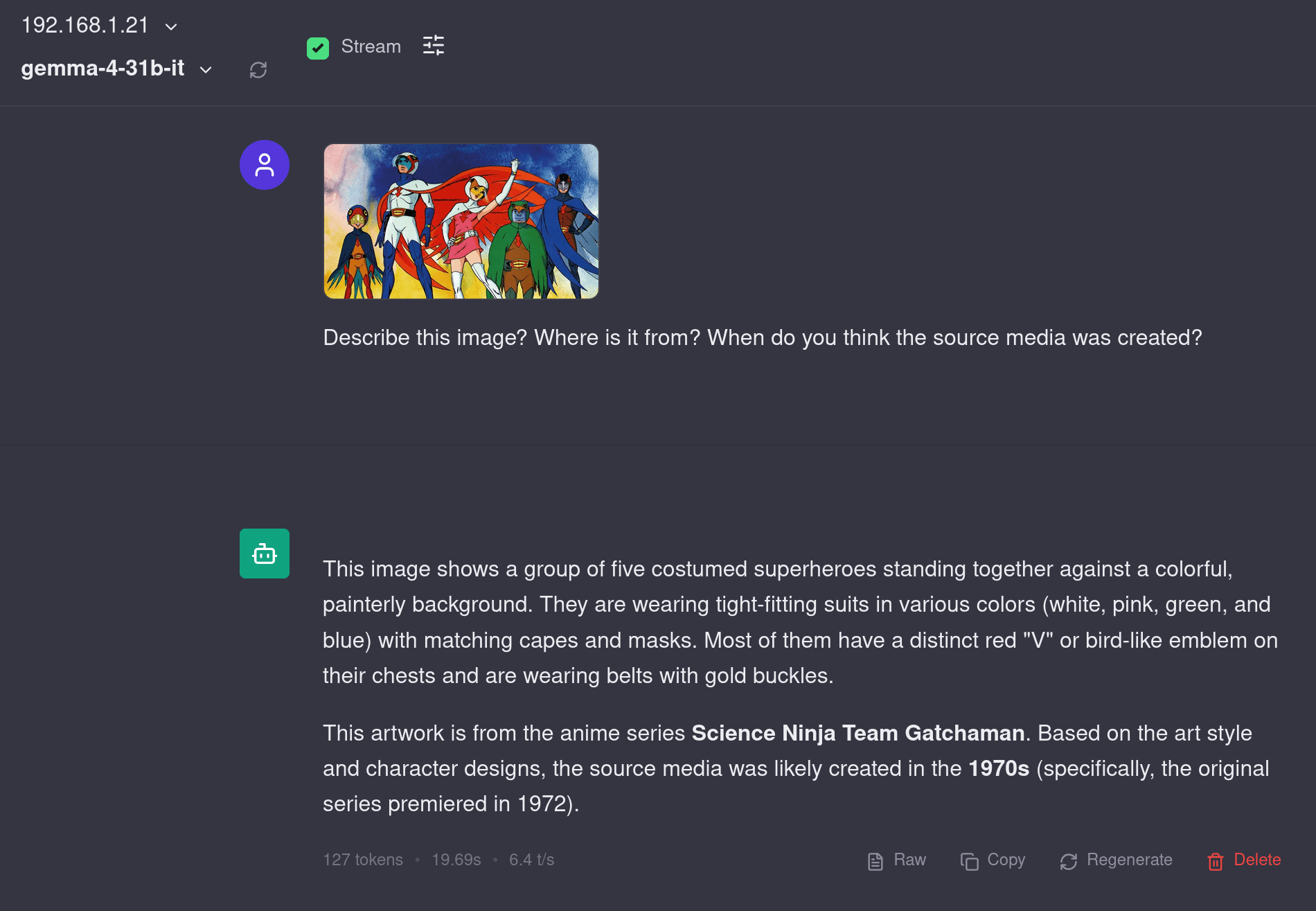
The Gatchaman image recognition is actually pretty tough. After correcting it and totaling 20K tokens, I got it to say it was...
But that's just an excuse to do a multi-turn conversation that eventually increases context to be pretty large. The prompt processing was very quick here, which I have come to expect from NVIDIA hardware.
Bonus: Gemma-4-31B-it
This alone shows why the gemma series of models is my favorite. Nailed it with only 127 tokens.
Conclusion and Performance Analysis
Here is the complete summary of the performance you would expect in this setup. I bolded Qwen3.5 series as I think this is the series of models most people would want to run. Even though the 122B-A10B is almost 3x larger than the 35B-A3B version, the token generation speed is only 33% slower. That's a great bargain, IMO.
| Model Name | Version | TP | Tokens Generated | Time (sec) | Rate (tokens per sec) |
|---|---|---|---|---|---|
| Qwen2.5-7B-Instruct | 0.16.0 | TP=1 | 448 | 34.76 s | 12.9 tk/s |
| Qwen2.5-7B-Instruct | 0.16.0 | TP=2 | 352 | 15.65 s | 22.5 tk/s |
| Qwen3-4B-Instruct-2507 | 0.16.0 | TP=1 | 934 | 37.51 s | 22.2 tk/s |
| Qwen3-4B-Instruct-2507 | 0.16.0 | TP=2 | 675 | 20.00 s | 33.7 tk/s |
| Qwen3-VL-4B-Instruct | 0.16.0 | TP=1 | 1250 | 56.58 s | 22.1 tk/s |
| Qwen3-VL-4B-Instruct | 0.16.0 | TP=2 | 1587 | 47.64 | 33.3 tk/s |
| Qwen3-VL-32B-Thinking | 0.16.0 | TP=1 | (fail) | (fail) | (fail) |
| Qwen3-VL-32B-Thinking | 0.16.0 | TP=2 | 4597 | 673.00 s | 6.8 tk/s |
| Qwen3.5-35B-A3B | 0.19.0 | TP=2 | 7884 | 254.78 s | 30.9 tk/s |
| Qwen3.5-122B-A10B | 0.19.0 | TP=2 | 8847 | 405.6 s | 21.8 tk/s |
.png)
Can we go faster? Absolutely. There's room for tuning, but I am happy with this result for now. Immediate things to explore down the line:
- Can we get
flash_attnworking for the attention backend? - Will we always need
--enforce-eager? Can we compile CUDA graphs?
But, consider that the performance overall is what you would expect from DGX Sparks. Again, this is a device with 20 ARM CPU cores and a custom Blackwell chip at a specific power envelope. You can't expect blazing fast speeds for 273 GB/s worth of memory bandwidth, but you can expect to be able to link 2 together and be able to operate larger models at tolerable speeds. That's a win here.
But the big win from my testing and experience with other GPUs in large context scenarios is the prompt processing speed. NVIDIA GPUs simply seem to stay very performant in very large context processing. It feels like like large context lengths don't affect the time to first token generation as much as solutions from AMD and Intel. AI agents are becoming a huge thing, and I think this is where it makes sense to buy a DGX Spark over a Strix Halo PC.
You can do the same type of clustering and networking with RDMA on the AMD side of things but the prompt processing performance is worth considering. AMD, if you're reading this, I can test a couple of machines for you. Hahaha...
Overall, my opinion is that clustering DGX Sparks is still not a user-friendly experience. There is work needing to be done. If you're okay with a lot of details hidden away from you, then yes, a Docker image makes sense. But when things are wrapped in a complicated Docker container, it's worth reflecting on how accessible and usable your software and hardware stack really is.
Would I still buy the 2 DGX Sparks? I probably wouldn't buy 2. But I would absolutely buy 1. It's a great little machine to put into use as an AI appliance or just tinkering with basic small model fine-tuning. Did it fall short of the hype? Yes, I honestly think so.
Video
Accompanying video here!